How To Use TFSA Labs
TFSA Labs is a research and analysis platform for South African TFSA investors. It helps you browse TFSA-eligible ETFs, compare their performance, build and backtest portfolio strategies, and measure the opportunity cost of your investment decisions.
This guide walks through a complete investor workflow using every tool on the platform, from shortlisting ETFs to setting a strategy and tracking it over time.
Account tiers
Most research tools are free. The ETF list, ETF detail pages, risk-return analysis, optimal strategies, bad strategies, and ETF compare require no subscription. The Pro tier (R250/year) adds the strategy builder, portfolio tracking, strategy comparison, and TFSA growth forecast. New accounts get a free trial to evaluate the full Pro feature set before subscribing.
1. Shortlist ETFs from the TFSA list
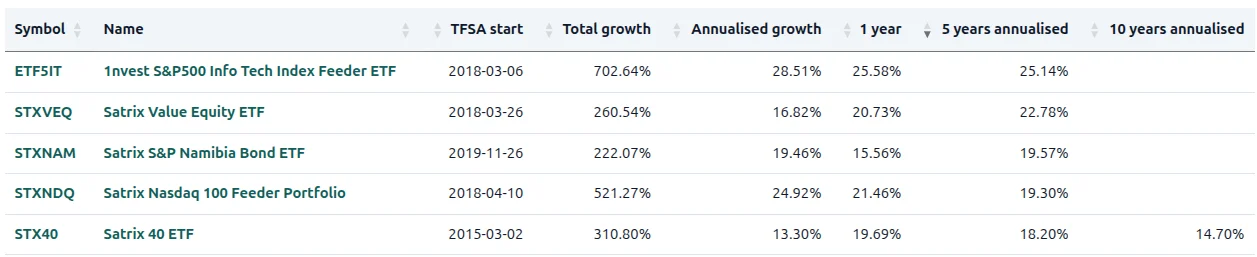
Start at the TFSA ETF list. This is your starting point. Look at the five-year annualised growth column and set a threshold of 5 years — you want ETFs with at least that much history. Filter down to a shortlist of ETFs that have delivered a CAGR greater than 8% over that period. The list also shows total expense ratios, so you can favour lower-cost funds that keep more of your returns.
Browse all TFSA-eligible ETFs, check their history, and build your shortlist.
Browse TFSA ETFs →2. Research risk, return, and strategy history
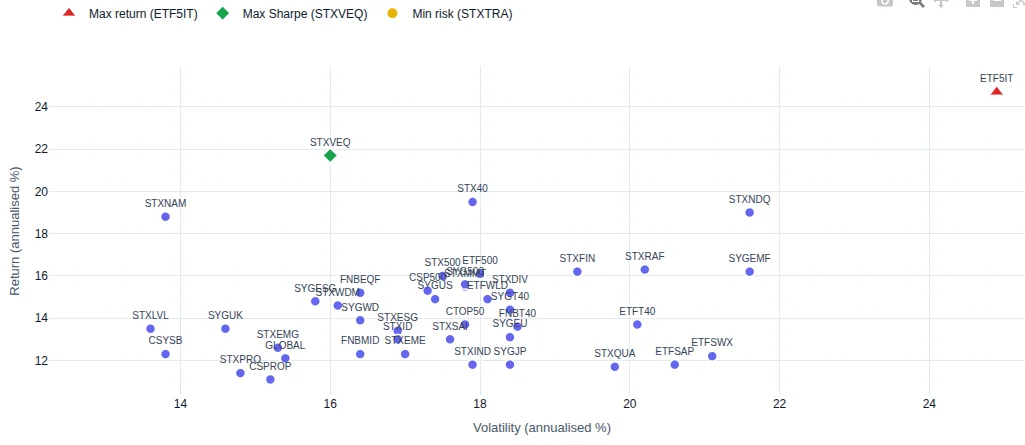
Take your shortlist to the risk-return analysis. This plots every TFSA-eligible ETF on a volatility-versus-return scatter chart so you can see which of your shortlisted ETFs offer the best risk-adjusted performance. Check the optimal strategies page to see which single ETF choices have performed best historically, and the bad strategies page to see which ones to avoid.
Analyse risk and return profiles and see what history says about the best and worst ETF choices.
Risk-return analysis →3. Compare correlations and remove overlap
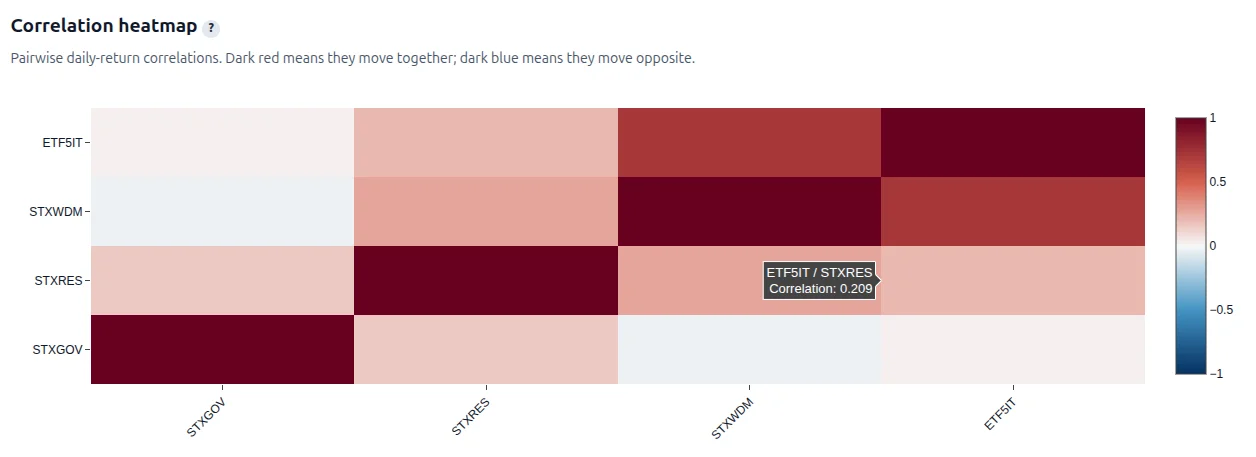
Open the ETF comparison tool with your shortlisted ETFs. Look at the correlation heatmap — ETFs that are highly correlated (above 0.75) tend to move together, so holding both adds little diversification. Remove the redundant ones. You want a set of ETFs that complement each other, not a collection of correlated clones.
Compare your shortlisted ETFs side by side and check correlations to build a diversified set.
Compare ETFs →4. Build and refine a strategy
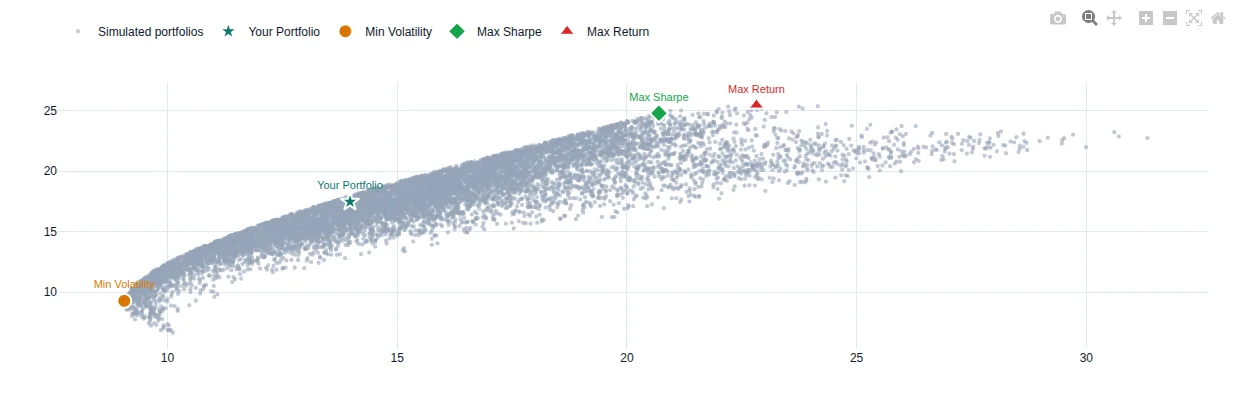
Move to the strategy builder (Pro feature, available during trial). Load your shortlisted ETFs with equal weights as a starting point. Review the backtest results: annualised growth, volatility, Sharpe ratio, and maximum drawdown. Then open the efficient frontier chart — it shows simulated portfolios at every risk level. Adjust your allocation weights to move along the frontier toward your preferred risk-return balance.
Once you are happy with the allocation, save the strategy with a clear name and description. Saved strategies appear in your strategy library for later use.
Build an allocation, check the efficient frontier, and save your strategy.
Open strategy builder →5. Record your portfolio
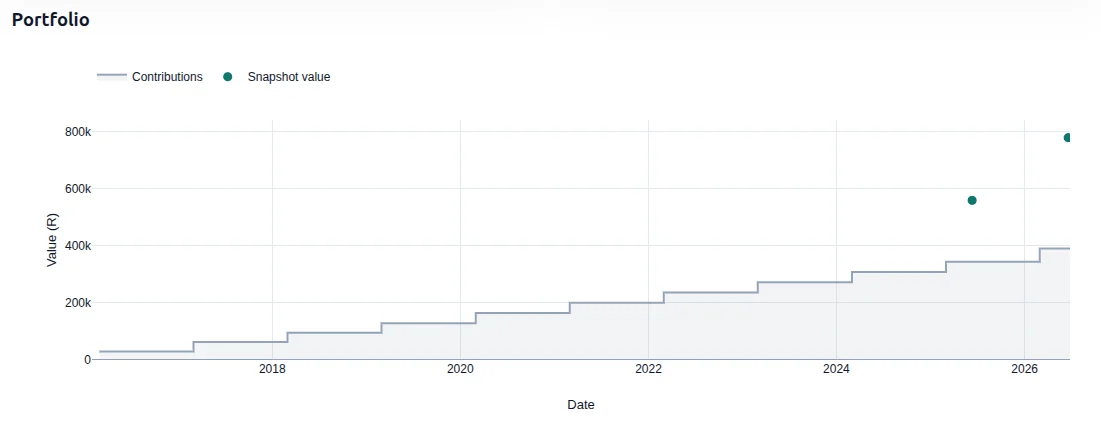
Go to My Portfolios (Pro feature) and create a portfolio that reflects your actual TFSA. Enter your contribution history and current holdings. The platform computes your money-weighted rate of return. Take a portfolio snapshot to capture your portfolio's state at a point in time — you will use this in the next step.
Record your actual TFSA contributions and holdings, then take a snapshot.
My Portfolios →6. Compare your portfolio against strategies
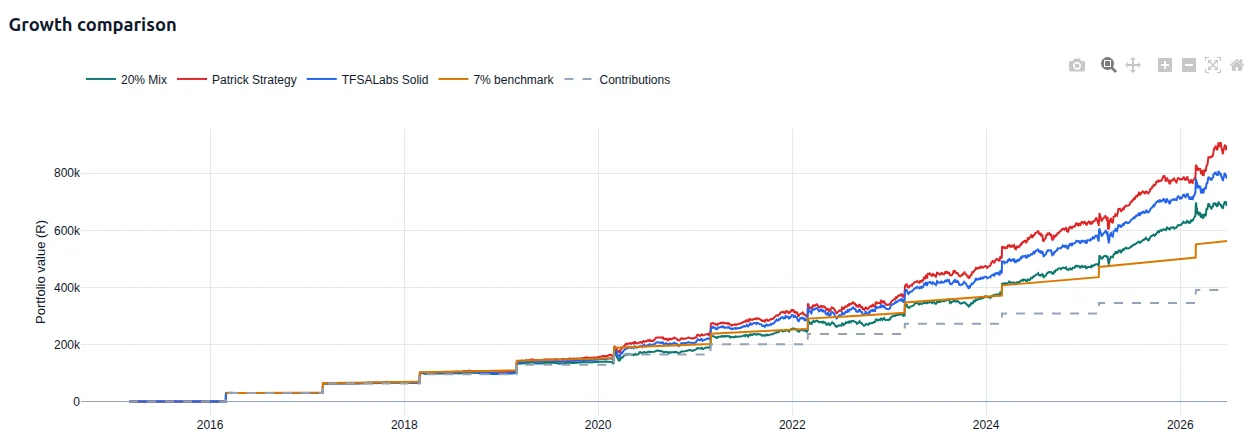
Use the portfolio strategy comparison tool (Pro feature). Select your portfolio snapshot as the baseline, then add your saved strategy alongside pre-built global strategies from the platform. The tool runs a full backtest against your actual contribution schedule, showing a daily NAV timeline, final portfolio values, and money-weighted returns. It also computes the opportunity cost — the difference between what you earned and what you could have earned.
Analyse the results. If your strategy underperforms, go back to the strategy builder to try different allocations. Iterate until you are confident in the plan.
Compare your portfolio against strategies using your real contribution schedule.
Strategy compare →7. Commit and set a review cadence
Once you have settled on a strategy, implement it in your TFSA. Buy the ETFs according to your allocation weights. The hard part now is to hold tight and not peek at every market swing.
TFSA Labs can help you stay the course. Configure the platform to send you a portfolio strategy review every year, half year, or quarter. This gives you a regular check-in without the temptation to tinker based on short-term noise.
8. Use the forecast as a long-term reminder
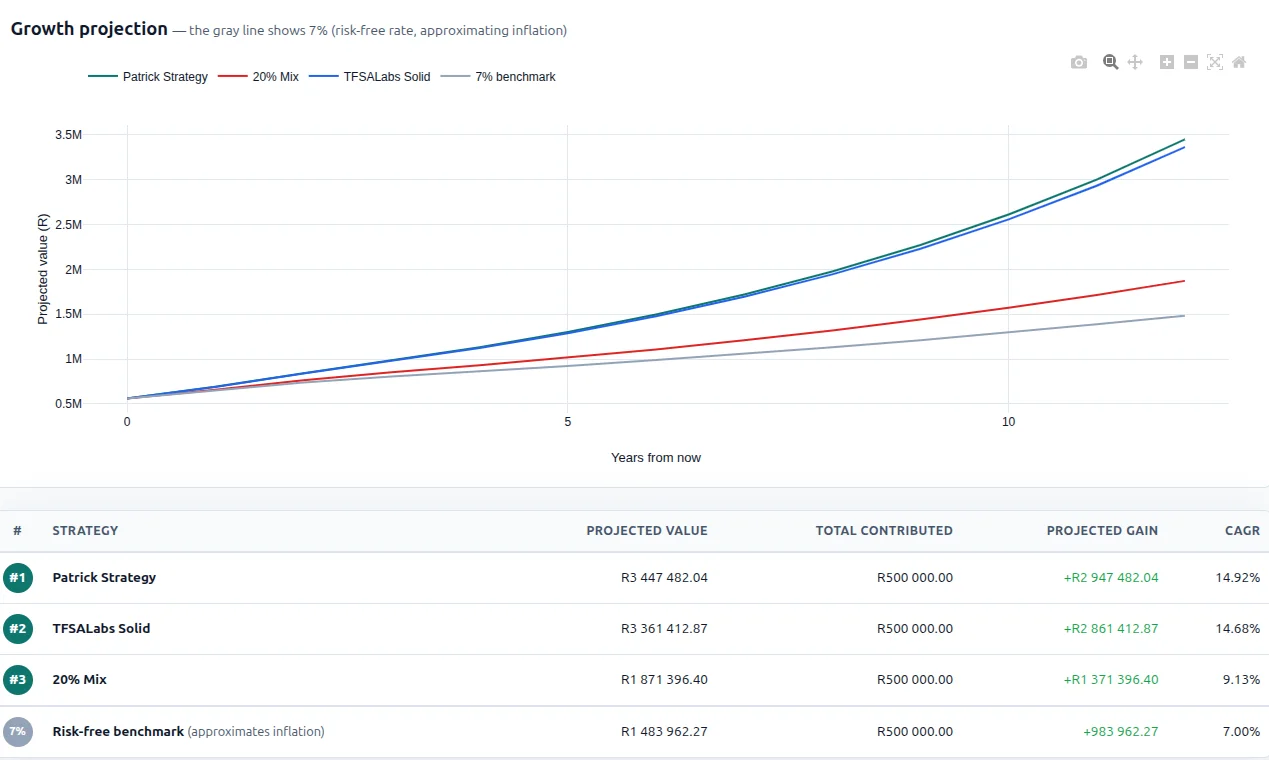
The TFSA growth forecast (Pro feature) projects your TFSA's future value using your strategy's compound annual growth rate. It is a hypothetical projection — no guarantee — but it serves as a powerful reminder of why asset allocation and regular contributions matter over decades. Revisit it when markets are down to remind yourself that time in the market beats timing the market.
New accounts get a free trial of all Pro features. Follow this workflow step by step.
Create free account →Also read: How To Start And Manage A TFSA In South Africa - a practical guide to opening and funding your account.
Try the tools behind this article
Create a free account to compare ETFs, explore the efficient frontier, and test optimal strategies with your own data - no credit card required.
Create free account